

Walkin' : OsmAnd~ from F-Droid with Pixel and GOS. I will check out how it works. Thank you.

Kurze Fragen Faden
Zur Vermeidung von Spam werden deine Posts vor Veröffentlichung von den Moderatoren geprüft, falls du Links verwendest.
-
-
-
Connected to 43 of 45 satellites showing at 43 metres on OSMand this morning.
Light rain and no real breeze. A lovely coffee time.
-
Das Durston Gear X-Mid 1 hat auch 2 Eingänge, is das richtig?
-
Das Durston Gear X-Mid 1 hat auch 2 Eingänge, is das richtig?
Ja

-
Some more test findings from OSMand that I couldn't find in the directions. I used a nother app that has since been de-commissioned hence my trialling this for some walks soon
--'Altitude adjustment' in Maps is (likely) broken.
I've been using the straight 'GPS altitude' and although I've not gone over 70 metres all is quite accurate so far.
I usually use a stick to stir my chai...
--You must leave 'Allow Background Useage' on for a track to be recorded when phone 'sleeps'.
Evviva!
-
An die Bikepacker: Suche ein wirklich kleines Schloss für Ausfahrten, um mal schnell beim Aldi reinzurennen.
Was gibt es da für Empfehlungen? -
An die Bikepacker: Suche ein wirklich kleines Schloss für Ausfahrten, um mal schnell beim Aldi reinzurennen.
Was gibt es da für Empfehlungen?was wäre denn dein Gewichtslimit? Das entscheidet am Ende zwischen Typ "Kabelbinder" vs Typ "da kann es an der Kasse auch mal länger dauern"
-
An die Bikepacker: Suche ein wirklich kleines Schloss für Ausfahrten, um mal schnell beim Aldi reinzurennen.
Was gibt es da für Empfehlungen?Die hier sind denke ich am populärsten
Hiplok Z Lok - Security Ties - HiplokHiplok Z Lok security ties - lightweight, fast and convenient. Additional or temporary security for your bike or scooter.hiplok.com -
An die Bikepacker: Suche ein wirklich kleines Schloss für Ausfahrten, um mal schnell beim Aldi reinzurennen.
Was gibt es da für Empfehlungen?Bin zwar kein BikePacker, habe mir für den Jakobsweg aber mal folgendes Schloss zugelegt:
Surelock Flex Combo Air | Giant Bicycles DEGiant Surelock Air Loop ist ein leichtes Café-Kabelschloss mit einem 3-stelligen, zurücksetzbaren Zahlenschloss, das in Ihre Trikottasche oder Satteltasche…www.giant-bicycles.comSteht bei mir in der LighterPackliste mit 48 g; hindert gegebenenfalls jemanden daran, einen Rucksack oder ein Rad bei Gelegenheit einfach mitzunehmen. Aber wirklich gesichert ist ein wertvoller Gegenstand dadurch natürlich nicht.
-

An die Bikepacker: Suche ein wirklich kleines Schloss für Ausfahrten, um mal schnell beim Aldi reinzurennen.
Was gibt es da für Empfehlungen?Bin zwar kein BikePacker, habe mir für den Jakobsweg aber mal folgendes Schloss zugelegt:
https://www.giant-bicycles.com/de/surelock-flex-combo-airSteht bei mir in der LighterPackliste mit 48 g; hindert gegebenenfalls jemanden daran, einen Rucksack oder ein Rad bei Gelegenheit einfach mitzunehmen. Aber wirklich gesichert ist ein wertvoller Gegenstand dadurch natürlich nicht.
Habe genau das, ohne den Giant Aufdruck, mal für 5,99 irgendow mitbestellt und nutze es für meine Bikepackingtouren. Den Kabelbinder habe ich auch, der ist für mich aber unpraktikabel, weil zu kurz.
Das Surelock ist so lang, dass man es nicht nur durch das Rad sondern auch gleich noch durch die Schlafe von der Satteltasche führen kann.
-
Weiß jemand was das für ein Tier ist? Größe etwas kleiner als ein Fuchs, zierliche Schnauze, kleine rosa Ohren. Buschiger Schwanz fast wie von einer Wildkatze, auf dem Rücken dunklers Fell, gefunden in Litauen.
-

Weiß jemand was das für ein Tier ist?
Von dem Foto her sieht es für mich aus wie eine Hauskatze...
-
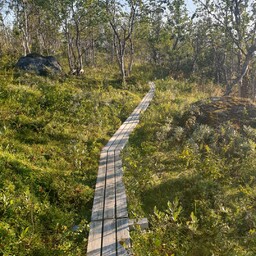
Weiß jemand was das für ein Tier ist?
Von dem Foto her sieht es für mich aus wie eine Hauskatze...
Sehe ich auch so.
-

Weiß jemand was das für ein Tier ist?
Von dem Foto her sieht es für mich aus wie eine Hauskatze...
Sehe ich auch so.
Ach, doch keine neue Spezies entdeckt die nach mir benannt werden könnte. Dann lohnt es sich ja auch nicht sie zu probieren.
-
Kann man selbst ein Schuhprofil von einem Traumrunner wieder so aufbauen, dass es danach ein paar hundert Kilometer hält. Irgendwelche 2mm Aufkleber mit Gummi, die saustark verklebt werden, oder so? Oder beim Schuster Sohle abfräsen lassen und dann ein Profil mit Trägerschicht wieder drauf?
-
Kann man selbst ein Schuhprofil von einem Traumrunner wieder so aufbauen, dass es danach ein paar hundert Kilometer hält. Irgendwelche 2mm Aufkleber mit Gummi, die saustark verklebt werden, oder so? Oder beim Schuster Sohle abfräsen lassen und dann ein Profil mit Trägerschicht wieder drauf?
Ich hatte mal im blauen Forum [https://tinyurl.com/schuhneubesohlung] was dazu geschrieben.
Auch wenn ich die Altra Superior nicht auf Hikes sondern eher im Alltag trage, die Vibram-Sohlen sind immer noch tip-top.
Schuhreparatur (Salomon) | Benjamin Schwarz - Werkstätte für Fußgesundheit
Es gab online auch mal coole Videos vom Reparaturprozess des Schusters, wenn ich mich richtig erinnere, wo man sehen konnte, wie das ganze gemacht wird. Finde ich aber grad nicht.
-
Ich hätte jetzt auch den Schwarz empfohlen – ist bei uns in der Gegend, Bad Bayersoien, aber meines Wissens der einzige, der das bundesweit so anbietet.
-
Das sieht ja einerseits gut gemacht aus - aber bis die Sohle komplett abgelaufen ist, ist zumindest bei mir auch die Zwischensohle durchgelaufen.
Gerade bei Laufschuhen und Trailrunnern steckt heute so viel des Lauf- und Tragegefühls in der Zwischensohle, dass ich es nicht für all zu sinnvoll halte nur die untersten paar mm Gummi neu zu machen, -
Ich wage mich jetzt das erste Mal allein mit Übernachten in den Wald.
ich hab 1,5Tage ohne fixe Wasserquelle und möchte den Filter nur im Notfall benutzen.Wieviel Wasser würdet ihr da zum Trinken rechnen? Fürs Essen brauche ich ca 1l und gut auf den Rucksack bringe ich 3l.
Ich hab schon überlegt für Essen was aus dem Bach beim Biwagplatz abzukochen.
-
Jetzt mitmachen!
Du hast noch kein Benutzerkonto auf unserer Seite? Registriere dich kostenlos und nimm an unserer Community teil!